
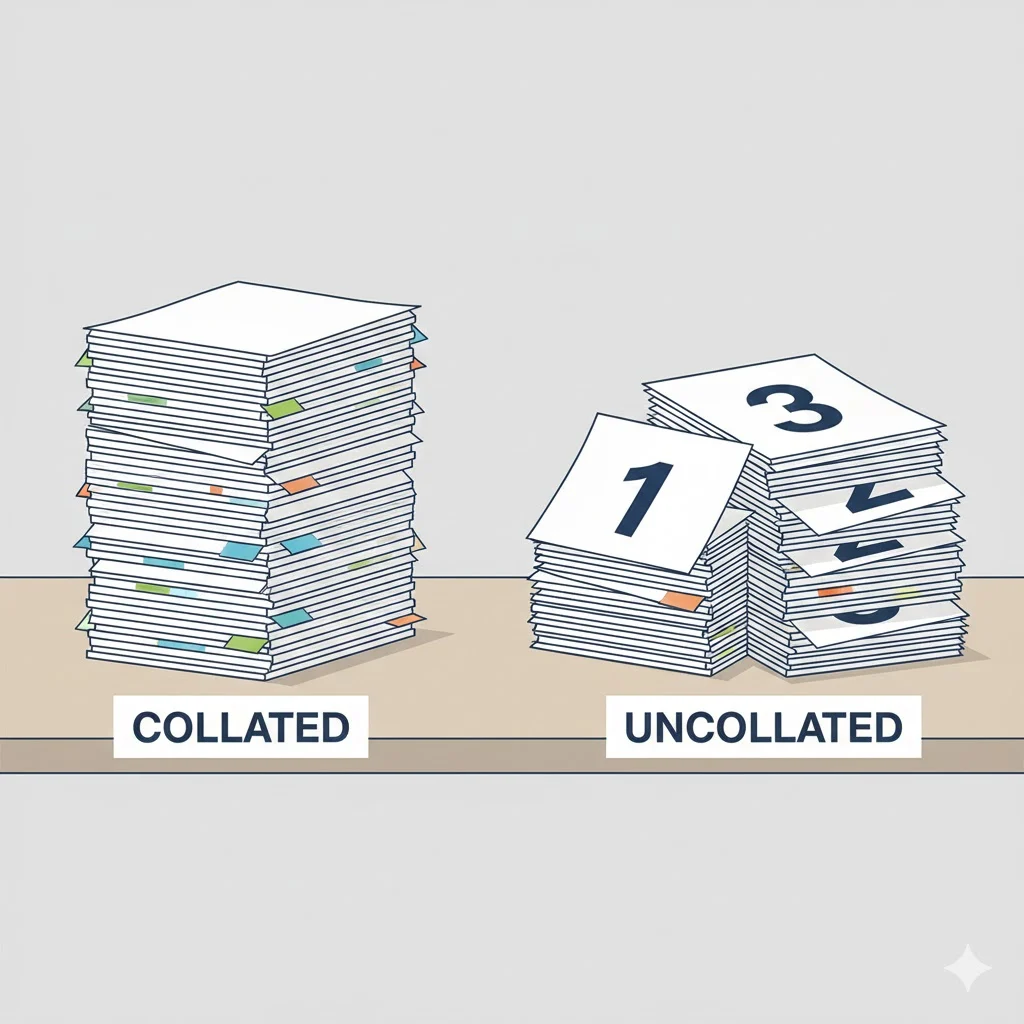

Collated in printing means that printed pages are arranged in the correct, sequential order as complete sets. For example, if you print a three page document in five copies, collated printing produces five complete sets in the order 1, 2, 3 instead of grouping all page 1s together, then all page 2s, and so on.
Printing terms can be surprisingly confusing, especially when a single checkbox can completely change the final result. One of the most common questions people ask when printing documents is about the word collated. You may have seen it in a printer dialog box or heard it mentioned at a print shop and wondered what it actually means.
In this guide, you will learn what collated means in printing, how it works in real situations, why it matters, and when you should choose collated or uncollated printing. By the end, you will be able to make the right choice every time you print, whether at home, in an office, or at a professional print shop.
What Does Collated Mean in Printing?
In printing, collated refers to pages that are printed and organized into complete, correctly ordered sets.
Instead of printing all copies of page one first, then page two, collated printing assembles each copy as a full document before moving on to the next copy.
As a result, each printed set is immediately ready to use, staple, bind, or distribute.
Understanding Collation in Simple Terms
To make this easier to visualize, imagine you are printing a four page document with three copies.
Collated Printing Output
- Copy 1: Page 1, Page 2, Page 3, Page 4
- Copy 2: Page 1, Page 2, Page 3, Page 4
- Copy 3: Page 1, Page 2, Page 3, Page 4
Each copy comes out as a complete packet.
Uncollated Printing Output
- Page 1, Page 1, Page 1
- Page 2, Page 2, Page 2
- Page 3, Page 3, Page 3
- Page 4, Page 4, Page 4
Here, pages are grouped by number rather than by set.
Why Collated Printing Matters
Collation may seem like a small detail, but it can save a lot of time and frustration.
For instance, collated printing is especially helpful when:
- Printing reports for meetings
- Preparing handouts for classes or presentations
- Printing manuals or booklets
- Distributing multi page forms
Without collation, you would need to manually sort pages into the correct order, which becomes tedious with larger print jobs.
Where You Will See the Collated Option
Most modern printers and printing software include a collation option.
You may encounter it in:
- Home printer settings
- Office network printers
- PDF print dialogs
- Professional print shop order forms
Typically, it appears as a checkbox labeled Collate or Collated.
When the box is checked, the printer produces ordered sets. When it is unchecked, the pages are printed uncollated.
Collated vs Uncollated Printing Comparison
Understanding the difference between these two options helps you choose correctly every time.
Collated vs Uncollated Table
| Feature | Collated | Uncollated |
|---|---|---|
| Page order | Complete sets | Grouped by page number |
| Best for | Reports, booklets, handouts | Simple sorting, binding by page |
| Manual sorting needed | No | Yes |
| Time efficiency | High | Lower for large jobs |
Because of this difference, collated printing is usually preferred for everyday document distribution.
Real World Examples of Collated Printing
Office Example
An office prints 20 copies of a 10 page report for a meeting. With collated printing, each attendee receives a complete report in order.
School Example
A teacher prints lesson packets for students. Collated printing ensures each packet is already assembled correctly.
Business Example
A company prints training manuals. Collation allows the manuals to be stapled or bound immediately.
In all of these cases, collated printing saves time and reduces errors.
When Uncollated Printing Makes Sense
Although collated printing is often the default choice, uncollated printing still has practical uses.
For example, uncollated printing is useful when:
- You plan to bind documents by page number
- You need stacks of the same page for sorting or inserting
- A machine handles collation later in the process
In professional printing environments, uncollated printing is sometimes intentional and efficient.
Common Printing Mistakes Related to Collation
Even experienced users make mistakes with collation settings.
Forgetting to Check the Collate Box
This often leads to piles of mixed pages that must be sorted by hand.
Assuming the Printer Defaults Are Correct
Some printers default to uncollated printing, especially older models.
Confusing Collation with Duplex Printing
Collation controls page order, while duplex printing controls whether printing happens on one or both sides of the paper.
Being aware of these differences helps avoid wasted paper and time.
Collated Printing and Stapling or Binding
Collated printing is essential when documents will be stapled or bound.
Because pages are already in order, they can be:
- Stapled immediately
- Spiral bound efficiently
- Placed into folders without rearranging
In contrast, uncollated pages must be sorted before finishing, which slows down production.
Collated Printing in Digital and Professional Printing
In digital and commercial printing, collation is often automated.
Professional printers use machines that:
- Print in order
- Stack pages as complete sets
- Prepare documents for finishing
However, customers still need to specify whether they want collated or uncollated output when placing an order.
Polite and Professional Ways to Ask About Collation
If you are working with a print shop or office staff, clear communication helps.
Examples:
- Are the documents printed collated
- Please provide collated sets for each copy
- The job requires collated printing for easy distribution
Using the term correctly ensures you get the result you expect.
Frequently Asked Questions
1. What does collated mean when printing multiple copies?
It means each copy is printed as a complete set in the correct page order.
2. Is collated printing better than uncollated?
It depends on the task. For most documents, collated printing is more convenient.
3. Should I choose collated for reports?
Yes. Reports are usually easier to distribute when printed collated.
4. What happens if I do not collate?
Your pages will be grouped by page number, requiring manual sorting.
5. Does collated printing take longer?
It may take slightly longer for the printer, but it saves time overall.
6. Is collated the default setting on printers?
Not always. Some printers default to uncollated, so it is best to check.
7. Can all printers collate?
Most modern printers can, but very basic or older printers may not.
8. Is collation the same as binding?
No. Collation organizes pages, while binding physically holds them together.
Conclusion
So, what does collated mean in printing? It means that pages are printed and arranged into complete, correctly ordered sets, ready for immediate use.
To recap:
- Collated printing produces full document sets
- It saves time and reduces sorting errors
- It is ideal for reports, handouts, and manuals
- Uncollated printing still has specific uses
By understanding this simple but important option, you can print more efficiently and avoid common mistakes in both home and professional settings
Discover More Post
What Does ETOH Mean in Medical Terms? Clear Explanation
What Does PEA Mean in Medical Terms? Pulseless Electrical …