
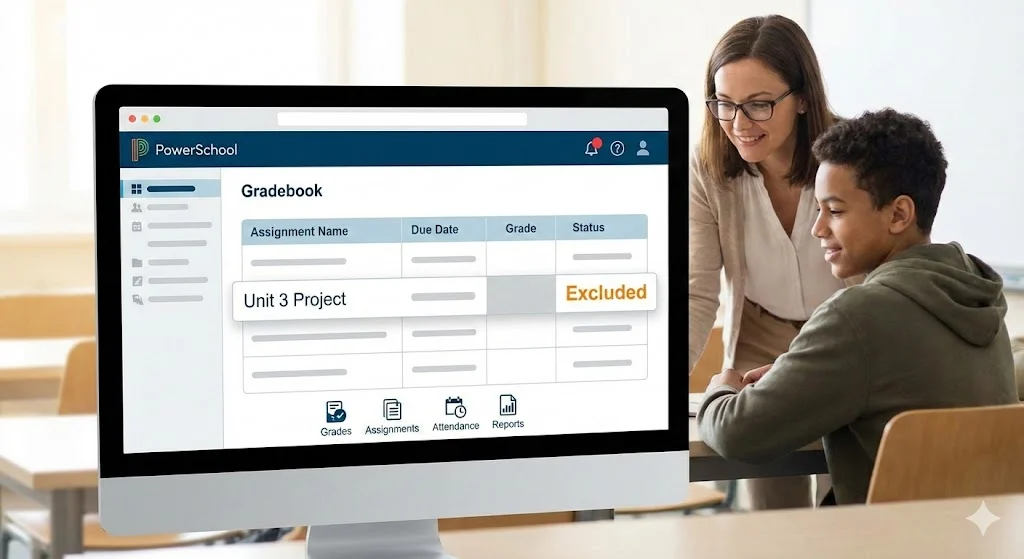

Are you checking PowerSchool and suddenly see “Excluded” next to a grade, assignment, or attendance record? You are not alone! Many students, parents, and teachers wonder what does excluded mean in PowerSchool and why that label appears. It can feel confusing when you expect a number and instead see a word that makes you wonder if something is missing, ignored, or scored differently.
In this article, I break down the meaning of excluded in PowerSchool in the simplest way. You will learn what it really means, why it happens, how it affects grades or attendance, and how to fix it or understand it better. Whether you are a student trying to interpret your report or a parent checking progress, this guide will make the term easy to understand. Let’s start with the basics!
What Does Excluded Mean in PowerSchool?
PowerSchool is a popular student information system used by schools worldwide to track grades, attendance, and schedules. When you see the word excluded in PowerSchool, it means that a particular grade, assignment, or attendance record is not counted in the overall calculation shown.
In other words, excluded items are left out on purpose so they do not impact the final grade or total attendance tally.
Here are common places where you might see excluded:
- Assignments
- Grades
- Attendance days or periods
- Category scores
Example
A teacher might assign homework but decide it shouldn’t affect your grade yet. So PowerSchool shows it as excluded. You will see something like:
| Item | Score | Status |
|---|---|---|
| Homework #1 | 0/10 | Excluded |
| Quiz #1 | 9/10 | Included |
In this case, the homework is excluded so the 0 does not pull your grade down.
Why Does PowerSchool Mark Something as Excluded?
There are several reasons PowerSchool shows excluded instead of a grade or attendance total. The key idea is that excluded means not counted. Let’s break down the most common reasons.
1. Teacher Intent
Teachers sometimes give assignments that are for practice, draft work, or learning checks. They do not want those counted in your final grade. When they set up the assignment in PowerSchool, they choose an option to exclude it from grade calculations.
2. Weighting and Categories
In PowerSchool, assignments can belong to categories like Tests, Homework, Quizzes, or Participation. If a category is set to affect only a certain percentage of the final grade, teachers might exclude some items if they do not fit current grading goals.
Example:
- Tests count for 40%
- Homework counts for 30%
- Projects count for 30%
If a review sheet was entered, the teacher might exclude it until after the next grading period.
3. Grade Entry Errors
Sometimes a teacher starts entering grades but hasn’t finished. To avoid giving an inaccurate grade, the item might be temporarily excluded until final entries are completed.
4. Attendance Adjustments
If a student is absent for valid reasons, such as school activities or excused medical leave, attendance might be marked in a way that excludes those absences from attendance totals.
Common Places You’ll See “Excluded” in PowerSchool
Here is a breakdown of the major sections where PowerSchool displays excluded and what it means in each context.
Excluded Assignments
When assignments are excluded:
- They are listed on the teacher’s gradebook view
- They do not affect your current grade
- They may still appear in the gradebook for feedback
Example:
Assignment: Review Worksheet
Score: 85
Status: Excluded
Excluded Attendance
In attendance history, PowerSchool might mark certain days as excluded when they should not count toward attendance percentages (for truancy or state reporting).
Example:
| Date | Status |
|---|---|
| September 10 | Absent (Excluded) |
This could mean that the absence is excused and not included in absence totals.
Excluded Categories
PowerSchool group categories might show “excluded” if the teacher is testing out new assignments or planning grade weighting changes.
Dialogue Examples to Understand Excluded
Here are real‑sounding conversations that help you interpret excluded on PowerSchool.
Student Chat
Aisha: Why does my science grade say excluded?
Jay: Maybe Mr. Lewis is still finishing grades for that section.
Parent Text
Parent: I see ‘excluded’ next to the geometry test.
Teacher: It was a practice test so we excluded it from the term average. Final grades will include the real test.
How Excluded Affects Your Grade
The biggest question is always does it change my grade? The short answer is no, not if it is excluded.
When PowerSchool marks something as excluded:
- It does not count in the calculation of your average
- You can still see the score but it is not factored into the totals
That means if you scored poorly on an excluded item, it won’t hurt your grade. If you did well, it won’t help the grade yet either.
Tip
Always ask your teacher if you are unsure why an assignment is excluded and whether it will be counted in the future.
How Teachers Exclude Items in PowerSchool
Teachers can choose to exclude items for many reasons. Understanding this helps clarify why you see excluded entries.
The Teacher’s View
PowerSchool allows teachers to:
- Create assignments
- Choose category
- Decide if it is included or excluded
If the teacher selects exclude, the system will show that label to everyone who looks at that item.
Example Steps
- Teacher enters assignment in gradebook
- Selects category and point values
- Chooses “exclude from grade calculation”
- Saves entry
- Students see excluded label
This is not an error. It is intentional.
PowerSchool Tips for Students and Parents
Here are simple tips that help you interpret PowerSchool entries:
1. Screenshots Help Questions
If you do not understand why something is excluded, take a screenshot and ask your teacher.
2. Read Teacher Comments
Sometimes the teacher explains why an item is excluded in the comments area.
3. Check Report Cards
Even if something is excluded in the current gradebook view, it might be included later on the official report card.
4. Understand Grading Periods
PowerSchool divides school year into grading periods. An item excluded now might be included when the grading period closes.
PowerSchool Excluded vs Dropped
PowerSchool also uses the term dropped. It’s similar but a bit different.
| Term | Meaning |
|---|---|
| Excluded | Not counted for now but visible |
| Dropped | Removed from grade calculations usually due to lowest score policies |
For example:
- A teacher may drop the lowest homework score automatically
- That dropped score is not shown in grade calculations
Excluded means it is intentionally ignored for the moment, not automatically removed by a rule.
PowerSchool and Weighted Grades
In some schools, PowerSchool uses weighted grading where categories count differently. In this case, excluded items can help teachers manage scores until they decide when to include them.
Example:
- Quizzes count 20%
- Labs count 30%
- Exams count 50%
If a quiz is excluded, it does not yet count toward the 20% quiz total.
How to Fix Excluded Items (If That Is the Goal)
If an assignment is mistakenly excluded, here are ways to address it:
Ask Your Teacher
The first and easiest step is to ask the teacher to include the item.
Check the Gradebook Setup
Sometimes the teacher accidentally checked the exclude box when entering grades.
School Tech Support
If PowerSchool is showing excluded due to a technical setting, your school’s tech support staff might help.
PowerSchool Parent Access and Excluded
Parents using PowerSchool Parent Portal may see excluded items too. It is helpful to know that:
- Excluded items still show up for transparency
- Parents can view scores and status
- Counting toward total grade depends on the teacher’s settings
Parent Tip
If you see excluded items and have questions, email or message the teacher politely asking for clarification.
Addressing Confusion Around “Excluded”
Seeing excluded might feel like missing information. Here are common concerns and clear explanations:
Concern: Is My Score Missing?
No. The score is still there, but it is not used in grade calculations yet.
Concern: Will It Change Later?
Possibly. Teachers may include the item later when grading periods end.
Concern: Does Excluded Mean Bad?
Not at all. It simply means the teacher chose not to use it yet.
Quick PowerSchool Excluded Checklist
Use this checklist to understand what excluded means:
- Check if it’s a test or practice work
- Look for teacher comments
- Ask if it will count later
- Compare to other included items
- Understand grading periods
PowerSchool Resources
For official information about PowerSchool features, you can explore:
- PowerSchool Support Website (external link)
- Your school or district help pages
- Teacher or tech coordinator guides
These resources explain how PowerSchool handles grade entry, weighting, and reporting.
Common Questions Students Ask
Q. Why can I see a score but it is excluded?
A. Teachers may enter scores early and exclude until final calculation.
Q. Does excluded mean I did bad?
A. No. Excluded means it is not counted yet.
Q. Can excluded items become included?
A. Yes, often after a grading period.
Practical Example Scenarios
Scenario 1: Math Homework
Teacher enters homework but sets it to excluded because they want to grade collectively later.
Scenario 2: Attendance
Student was at a school event. Attendance might show excluded so it does not count against attendance totals.
Scenario 3: Participation Score
A participation score might be excluded if it is part of a future grading plan.
Final Thoughts on Interpretation
Understanding what does excluded mean in PowerSchool comes down to remembering that excluded means not counted right now. It still shows up for transparency, but it does not change your grade yet.
Knowing the meaning helps you:
- Avoid confusion
- Ask informed questions
- Track true progress
- Communicate clearly with teachers
Conclusion
Now that you know what does excluded mean in PowerSchool, you can look at your gradebook with confidence. Excluded simply means the item is visible but not counted in the current grade or attendance totals. It does not mean the score is bad or missing. Teachers often use exclusion to manage practice work, test runs, or items they do not want to count yet. If you are unsure why something is excluded, the best step is to ask your teacher politely for clarification. Understanding this term helps you track progress, avoid misunderstandings, and stay informed throughout the school year.