
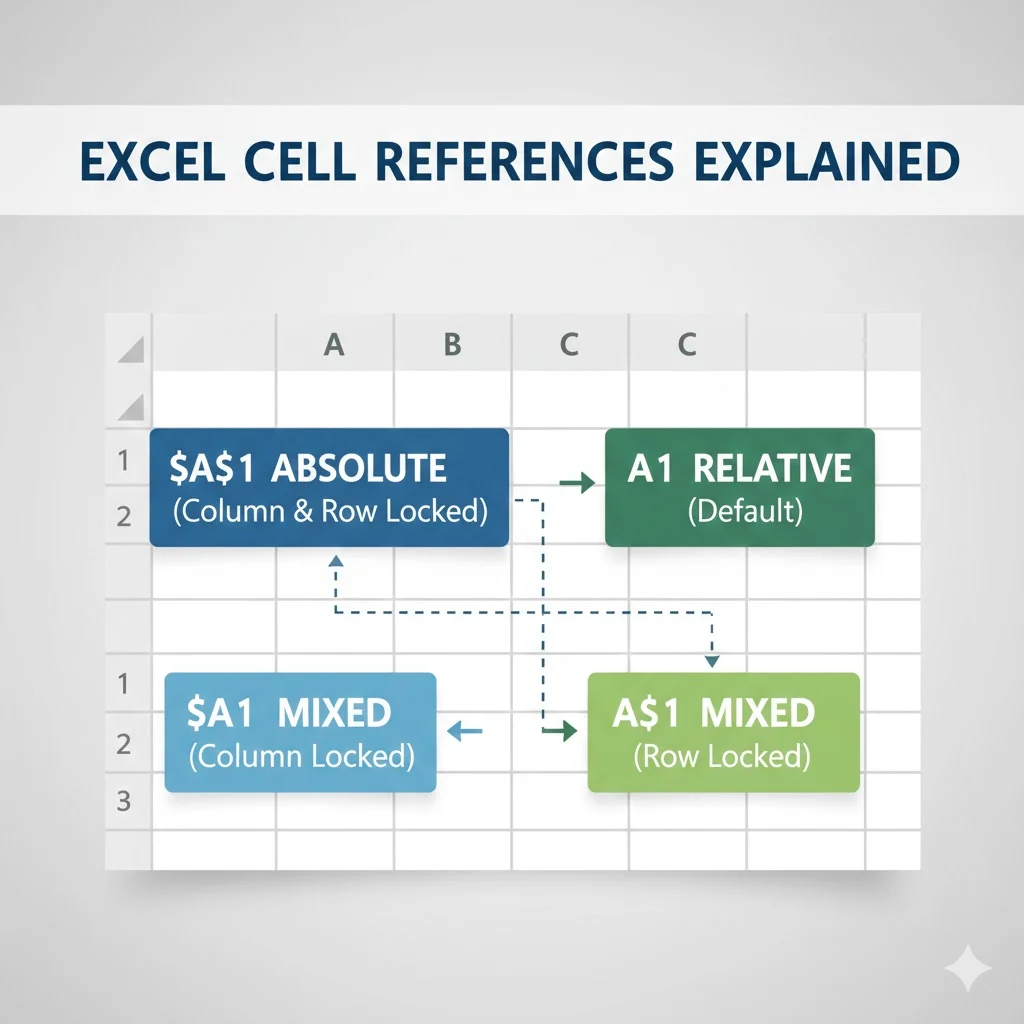

In Excel, the $ symbol is used to create an absolute cell reference. It locks a row, a column, or both so the reference does not change when a formula is copied or moved.
If you have ever copied a formula in Excel and noticed unexpected results, chances are the $ symbol was missing or misunderstood. At first, it looks like a small detail. However, this symbol plays a huge role in how Excel formulas behave.
Because Excel is built around formulas and calculations, understanding what $ means in Excel can save time, prevent errors, and improve accuracy. In this guide, you will learn exactly how the dollar sign works, why it matters, and how to use it correctly in real spreadsheets.
What Does $ Mean in Excel?
In Excel, the $ symbol is used in cell references to control whether rows or columns change when a formula is copied.
In other words, the dollar sign locks part of a cell reference.
Excel uses three main types of references:
- Relative references
- Absolute references
- Mixed references
The $ symbol is what turns a reference from relative into absolute or mixed.
Why the $ Symbol Is Important in Excel
By default, Excel uses relative references, which automatically adjust when you copy formulas. While this behavior is useful, it is not always what you want.
For example, when calculating totals, applying tax rates, or using fixed values, you often need a reference to stay the same. That is exactly where the $ symbol comes in.
Without it, formulas can break or return incorrect results.
Understanding Cell References in Excel
Before diving deeper, it helps to understand how Excel references work.
Relative Cell References
A relative reference changes when copied.
Example:
- A1
If you copy a formula containing A1 down one row, it becomes A2.
Absolute Cell References
An absolute reference does not change when copied.
Example:
- $A$1
No matter where you copy the formula, it always points to cell A1.
Mixed Cell References
A mixed reference locks either the row or the column, but not both.
Examples:
- $A1 locks the column
- A$1 locks the row
This flexibility is especially useful in tables and grids.
How the $ Symbol Works in Practice
The placement of the $ symbol determines what Excel locks.
Reference Types Table
| Reference | Meaning |
|---|---|
| A1 | Row and column change |
| $A$1 | Row and column are locked |
| $A1 | Column locked, row changes |
| A$1 | Row locked, column changes |
Each version behaves differently when copied across cells.
Examples of $ in Excel Formulas
Seeing examples makes the concept much clearer.
Example 1: Without the $ Symbol
Formula in cell B2:
=A2*C1
If you copy the formula down, Excel changes it to:
=A3*C2
This happens because both references are relative.
Example 2: Locking a Value with $
Now imagine C1 contains a fixed tax rate.
Formula:
=A2*$C$1
When you copy this formula down:
- A2 changes to A3
- $C$1 stays the same
As a result, the tax rate remains consistent for every calculation.
Example 3: Using Mixed References
Suppose you are building a multiplication table.
Formula:
=$A2*B$1
In this case:
- Column A stays fixed
- Row 1 stays fixed
- Other parts adjust automatically
This method allows formulas to work correctly across large ranges.
When to Use the $ Symbol in Excel
Although the dollar sign is powerful, it is not needed in every formula.
You should use $ when:
- Referring to constants such as tax rates or discounts
- Working with lookup tables
- Copying formulas across rows and columns
- Creating financial models
- Building dashboards or templates
On the other hand, you can avoid it when calculations should adjust naturally.
How to Add the $ Symbol Quickly
Instead of typing dollar signs manually, Excel offers a shortcut.
Steps:
- Click the cell reference in your formula
- Press F4 on your keyboard
- Excel cycles through all reference types
Each press changes the reference order:
A1 → $A$1 → A$1 → $A1 → A1
This shortcut is one of the fastest ways to master Excel formulas.
Common Mistakes with the $ Symbol
Even experienced users sometimes misuse the dollar sign.
Locking Too Much
Using $A$1 when only the column needs locking can limit flexibility.
Forgetting to Lock References
Failing to use $ when copying formulas often causes incorrect results.
Confusing Rows and Columns
Remember:
- Letters represent columns
- Numbers represent rows
Placing the $ in the wrong spot can change the formula behavior entirely.
Real World Use Cases
The $ symbol appears in many practical Excel scenarios.
Examples include:
- Sales commissions using fixed rates
- Budget spreadsheets with constant assumptions
- Currency conversion using a single exchange rate
- Grade calculations using fixed weight values
In each case, the dollar sign ensures consistency.
Alternate Meanings of $ in Excel
Although the $ symbol is mainly used for cell references, it can also appear in other contexts.
Currency Formatting
Excel uses $ to display currency values when formatting cells. This is visual formatting only and does not affect formulas.
Text and Symbols
The dollar sign can also appear as plain text in cells, just like any other character.
However, when used inside formulas with cell references, its role is almost always related to locking rows or columns.
Polite and Professional Usage Tips
When sharing Excel files with others, clarity matters.
Helpful practices include:
- Using absolute references for shared templates
- Adding comments explaining locked cells
- Keeping formulas readable and organized
These habits make spreadsheets easier to understand and maintain.
Frequently Asked Questions
1. What does the $ symbol do in Excel formulas?
It locks a row, column, or both so the reference does not change when copied.
2. What is the difference between $A$1 and A1?
$A$1 is fixed, while A1 changes when copied.
3. Can I lock only a row or column?
Yes. $A1 locks the column and A$1 locks the row.
4. Why does Excel change my formulas when I copy them?
Because Excel uses relative references by default.
5. How do I quickly add dollar signs in Excel?
Select the reference and press F4.
6. Is the $ symbol required in all formulas?
No. It is only needed when you want references to stay fixed.
7. Does the $ symbol affect calculation speed?
No. It only affects how references behave.
8. Is the $ symbol the same as currency formatting?
No. Currency formatting is visual, while $ in formulas controls references.
Conclusion
So, what does $ mean in Excel? It is a powerful tool that controls how formulas behave when copied or moved.
To recap:
- The $ symbol creates absolute or mixed references
- It prevents rows or columns from changing
- It is essential for accurate formulas
- It saves time and reduces errors
- It is widely used in professional spreadsheets
Once you understand how to use the dollar sign correctly, Excel becomes far more predictable and efficient.
Discover More Post
What Does Delta H Mean in Chemistry? Simple Explanation …
What Does PIM Mean in Hockey? Simple Explanation for New …